
Blogs & Events
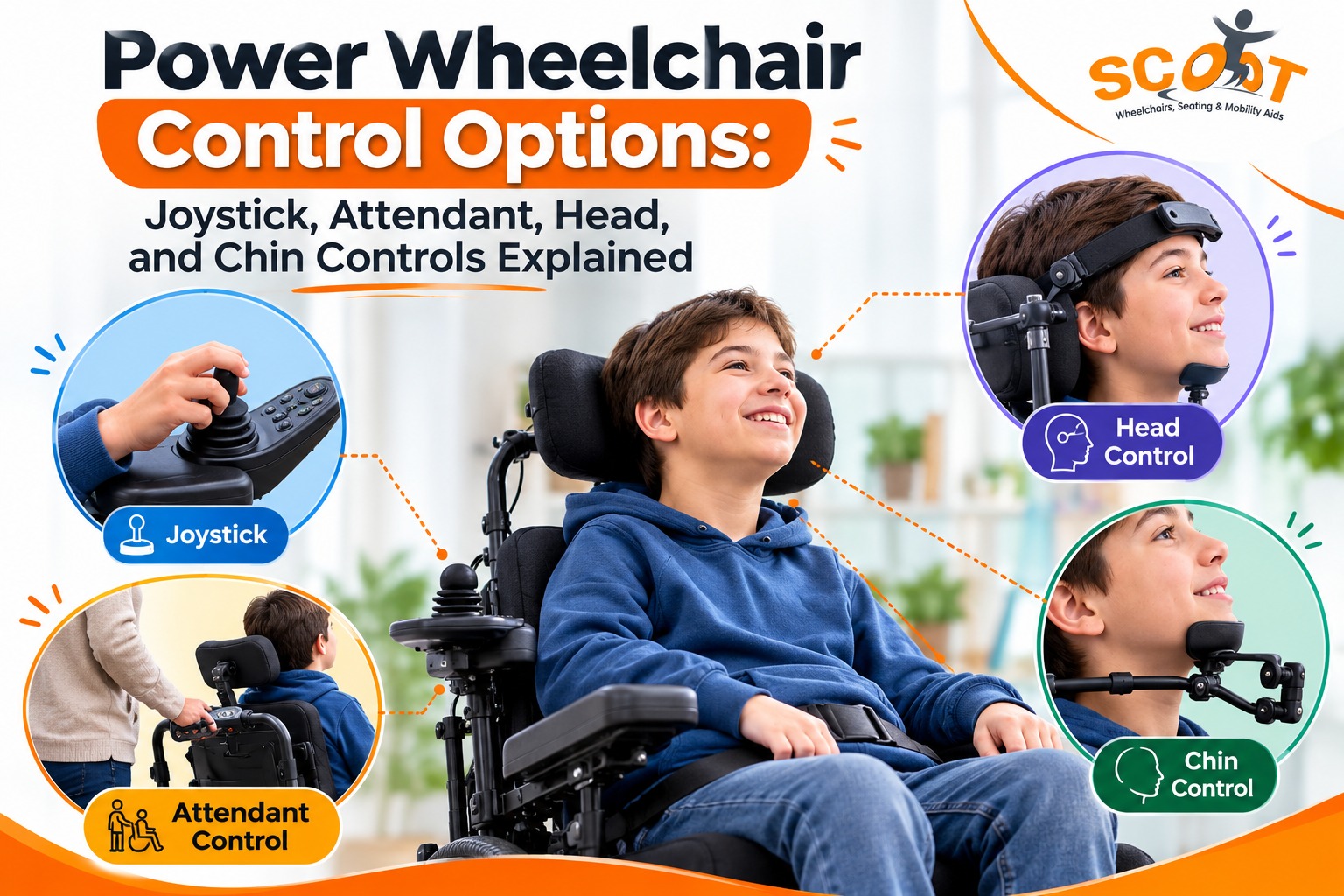
Power Wheelchair Control Options: Joystick, Attendant, Head, and Chin Controls Explained
Can you drive your wheelchair for one hour without hand strain, poor posture, or repeated corrections? The answer depends on the control system, seating position, muscle strength, movement range, and daily surroundings. The right power wheelchair control options can reduce effort and support safer movement at home, school, work, and outdoors.
A control system does far more than move a chair forward. It converts a small body movement into speed, direction, braking, and seating commands. Therefore, you need a system that responds to your strongest and most repeatable movement.
A poor match can cause fatigue, inaccurate steering, skin pressure, and reduced daily use. For this reason, control selection should begin with a clinical review rather than a product catalogue.
For choosing the right chair type first, read SCOOT’s guide on how do I choose the right wheelchair.
How Power Wheelchair Control Options Shape Daily Mobility
Control choice begins with the user. A clinician checks hand function, head stability, vision, posture, reaction time, skin condition, and endurance. Next, the team reviews door widths, ramps, floor surfaces, transport needs, and caregiver support.
The process follows an evidence, benefit, barrier, and action route. First, the team studies what you can do. Then, it links that ability with a suitable control. After that, specialists remove access barriers through seating, mounting, and programming. Finally, you practice in familiar spaces before regular use.
Joystick Driving for Users With Reliable Hand Movement
A joystick wheelchair suits users who can move one hand with repeatable control. The joystick sends proportional commands. A small push creates a slow response. A larger push raises speed. Therefore, you can manage curved turns, tight rooms, doorways, and open paths.
Moving a hand is one thing. Steering a chair through a narrow doorway is another. The shoulder needs support, the armrest must sit at the right height, and the wrist should not bend awkwardly. During a trial, the clinician may notice a loose grip, shaky fingers, short reach, stiffness, or tiredness after a few turns.
Modern power wheelchair control options include small joysticks, low-force models, ball tops, T-handles, goalpost grips, and centre-mounted controls. Some users prefer a light touch. Others need a larger handle that feels easier to hold during daily travel.
For example, a user with weak fingers may manage a larger handle. Meanwhile, someone with restricted shoulder movement may need the joystick closer to the body.
A power wheelchair assessment should test stopping distance, reverse driving, doorway entry, slopes, turning space, and crowded areas. These tasks may expose problems that a short clinic test misses.
Caregiver Driving When the User Needs Support
An attendant control wheelchair places a second control near the rear push handle. A parent, spouse, nurse, or support worker can then operate the chair. This option may suit users who tire quickly, lose alertness, or cannot manage busy areas.
The attendant control should support shared driving when possible. You may drive inside your home, while a caregiver handles steep ramps, crowded streets, or difficult entrances.
Good programming can limit speed and soften acceleration. In addition, correct handle height can reduce wrist, shoulder, and back strain for the caregiver. The control should remain easy to reach without forcing an awkward posture.
Before heading out, the user and caregiver should decide how they will signal a stop, a turn, or a change in route. Even a simple word or hand cue can avoid jerky movement, especially on ramps, crowded paths, or longer trips.
Head Controls for Consistent Upper-Body Direction
A head control wheelchair suits users who cannot operate a hand joystick but can move their head with control. The system may use proximity sensors, pads, mechanical switches, or proportional sensors.
One head-controlled wheelchair system recorded more than 90% directional accuracy when users operated it with a 45° head tilt. This result shows what measured head movement may achieve under tested conditions. However, every user still needs personal fitting, calibration, and training.
These power wheelchair control options work best when the body stays supported. The pelvis should not slide, the shoulders need steady contact, and the head must return to the same position. A cough, road bump, or tired posture can otherwise send the chair in the wrong direction.
The clinician may try switch scanning, proximity sensors, proportional control, or mode changes. With the right setup, you can steer, alter speed, tilt the seat, and move between chair functions.
A second power wheelchair assessment can help after several days of use. Fatigue patterns may appear during longer sessions rather than the first trial.
Matching Strength, Posture, and Control Method
The best control comes from repeatable movement, not maximum movement. You may move one arm through a wide range, yet fatigue may reduce accuracy after ten minutes. Another user may have less chin movement but maintain it for several hours.
Control system | Often suits | Main fitting checks |
| Standard or low-force joystick | Reliable hand or finger movement | Reach, grip, tremor, wrist angle, fatigue |
| Attendant control | Shared driving or caregiver support | Handle height, caregiver posture, speed limits |
| Head array | Reliable head movement | Headrest shape, sensor position, accidental activation |
| Chin joystick | Small, controlled chin movement | Mount stability, breathing, speech, transfer access |
An attendant control wheelchair may also act as a backup when you use another driving method. This gives families another option during illness, fatigue, crowded travel, or difficult routes.
The final choice should include trials across several places. Home corridors, lifts, ramps, pavements, classrooms, offices, and vehicle loading areas may expose different access issues.
Seating, Mounting, and Programming for Better Comfort
Control performance depends on the seating base. A poor cushion may allow pelvic movement. Weak back support may increase shoulder effort. An unsuitable headrest may interfere with a head-control wheelchair.
Mounting changes access as well. Swing-away, centre-line, tray, and side mounts suit different movements and daily tasks. The mount must remain firm during braking, transport, transfers, and outdoor travel.
Programming shapes the wheelchair response. Specialists can adjust acceleration, deceleration, turning speed, joystick throw, dead zone, tremor filtering, and braking. They may also create separate indoor and outdoor profiles.
For example, you may use slower settings inside a flat or hospital. Then, you may select another profile for an open campus or wider outdoor path.
Future systems may include brain-computer interfaces. In one study, 7 of 9 participants, or about 77.8%, improved their overall Assessment of Learning Powered Mobility scores after BCI-based training. Such work shows a possible direction for users who cannot access hand, head, or chin controls.
For better posture support, read SCOOT’s guide on how to choose the best wheelchair seat cushion before final fitting.
SCOOT Mobility India for Custom Power Wheelchair Control Solutions
At SCOOT Mobility, we support users who need more than a standard joystick.
Our power control support includes:
- Standard joystick and modified joystick options
- Low-force controls for users with limited hand strength
- Head array systems for users with better head control
- Touchscreen, switch, and sip-and-puff control options
- Flexible mounting based on posture, reach, and movement
- Seating support through cushions, backrests, headrests, harnesses, and fitting reviews
- Guidance for users, families, caregivers, and therapists
- After-sales support, adjustments, and service assistance
We work with SWITCH-IT power control options, including modified joysticks, head array systems, touch screen systems, and sip-and-puff pneumatic systems. These controls can help users who cannot safely or comfortably manage a standard joystick.
Our goal is to avoid a fixed, one-size-fits-all wheelchair setup. We look at the user’s medical needs, posture, transfers, travel conditions, caregiver support, and daily routine before suggesting a control and seating plan.
This way, the final setup supports three things together: safe seating, accessible control, and practical everyday mobility.
Final Thoughts
The right control should match your strongest repeatable movement and daily routine. It should reduce fatigue, support posture, and allow safe stopping. A trained team can compare access, seating, mounting, programming, travel needs, and caregiver input before final fitting.
Choose power wheelchair control options through a proper trial rather than a quick product decision. Contact us at SCOOT, and we will help you plan a customised mobility setup.
Frequently Asked Questions
What are the different power wheelchair control options?
Common choices include hand joysticks, attendant controls, head arrays, chin joysticks, switches, touchscreens, sip-and-puff systems, and developing brain-controlled mobility interfaces for users.
Who needs head or chin control in a power wheelchair?
Users with restricted arm movement may choose head or chin controls when they can produce stable, repeatable, controlled, and safe upper-body movements consistently.
Can a caregiver control a power wheelchair?
Yes, a caregiver can use a rear-mounted attendant control after suitable fitting, programming, safety checks, route planning, and shared driving practice with the user.
Is joystick control suitable for all users?
No. A joystick can be difficult when the hand shakes, the grip feels weak, or the arm tires midway through a trip. In those cases, a head, chin, or caregiver control may suit the user better.
How do specialists choose the right control system?
They usually watch the person drive first. A narrow doorway, a ramp, or ten minutes of repeated turning can reveal more than a quick hand test. They also check seating, eyesight, daily travel, and who helps at home.